Langchain4j - 提示词工程、多模态、以及 Tool Calling

提示词工程介绍

在 LangChain4j 的低阶与高阶 API 中,提示词工程被高度结构化地抽象为了以 ChatMessage 为核心的消息流模型。这与市面上大多数原生大模型(如 OpenAI 结构、Anthropic 结构)的 Chat Completions 协议实现了完美对接。理解了提示词这套结构,就掌握了控制大模型灵魂的方向盘。


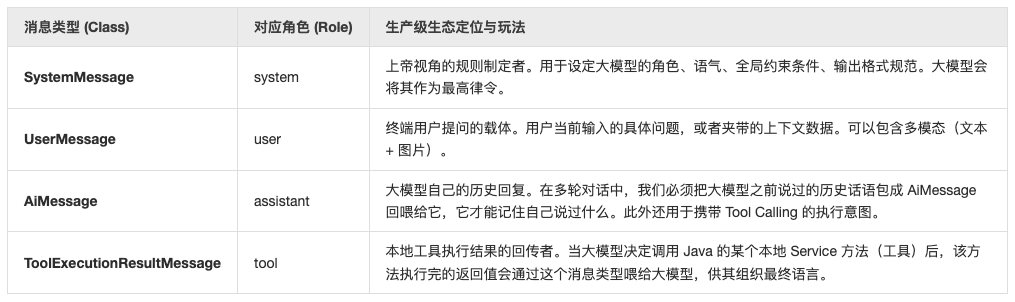
核心四大消息元组:在大模型的多轮对话和提示词设计中,LangChain4j 提炼出了四个最基础的核心消息类,它们全部继承自 ChatMessage 接口:

例如 UserMessage:

1
2
3
4
5
6
7
8
9
10
11
12
UserMessage msg = UserMessage.builder()
.name("user_12345") // name 是谁说的,用于做用户的隔离
.contents(List.of( // contents 是用户说了什么(可以是图/文/音)
TextContent.from("帮我总结这张图的内容"),
ImageContent.from("file:/tmp/report.png")
))
.attributes(Map.of( // attributes 是给框架看的“隐形标签”
"userId", "user_12345",
"sessionId", "session_987",
"source", "mobile-app"
))
.build();

对于常见的提示词,可以参考 DeepSeek prompt-library,这里有很多已经写好的提示词模板可被使用。


提示词常见使用套路

演示项目依赖

关于父项目POM,可以参考 Langchain4j - 基础工程 - 父项目 POM

1
2
3
4
5
6
7
8
9
10
11
12
13
14
15
16
17
18
19
20
21
22
23
24
25
26
27
28
29
30
31
32
33
34
35
36
37
38
39
40
41
42
43
44
45
46
47
48
49
50
51
<dependencies>
<!-- langchain4j 低阶 API 整合 spring -->
<dependency>
<groupId>dev.langchain4j</groupId>
<artifactId>langchain4j-open-ai-spring-boot-starter</artifactId>
</dependency>

<!-- langchain4j 高阶 API 整合 spring(比如 @AiService)-->
<dependency>
<groupId>dev.langchain4j</groupId>
<artifactId>langchain4j-spring-boot-starter</artifactId>
</dependency>

<!-- langchain4j 整合第三方平台 -->
<!-- 此处以接入阿里百炼平台为例 https://docs.langchain4j.dev/integrations/language-models/dashscope -->
<dependency>
<groupId>dev.langchain4j</groupId>
<artifactId>langchain4j-community-dashscope-spring-boot-starter</artifactId>
</dependency>

<!--流式响应依赖-->
<dependency>
<groupId>dev.langchain4j</groupId>
<artifactId>langchain4j-reactor</artifactId>
</dependency>

<!-- spring boot webflux -->
<dependency>
<groupId>org.springframework.boot</groupId>
<artifactId>spring-boot-starter-webflux</artifactId>
</dependency>

<dependency>
<groupId>commons-io</groupId>
<artifactId>commons-io</artifactId>
<version>2.16.1</version>
</dependency>
</dependencies>

<build>
<plugins>
<plugin>
<groupId>org.springframework.boot</groupId>
<artifactId>spring-boot-maven-plugin</artifactId>
</plugin>
<plugin>
<groupId>org.apache.maven.plugins</groupId>
<artifactId>maven-compiler-plugin</artifactId>
</plugin>
</plugins>
</build>


配置文件

application.yml

1
2
3
4
5
6
7
8
9
10
11
12
13
14
15
16
17
18
server:
port: 8080

# https://docs.langchain4j.dev/tutorials/spring-boot-integration
langchain4j:
open-ai:
# 向容器中注入了一个 chatModel 对象
chat-model:
base-url: https://dashscope.aliyuncs.com/compatible-mode/v1
api-key: ${QWEN_API_KEY}
model-name: qwen3.7-plus
log-requests: true
log-responses: true
# 向容器中注入了一个 openAiStreamingChatModel 对象
streaming-chat-model:
base-url: http://localhost:11434/v1
api-key: api-key-xxx
model-name: "qwen3:4b"


基本套路演示

定义一个 PromptTestService:

1
2
3
4
5
6
7
8
9
10
11
12
13
14
15
16
17
18
19
20
21
22
23
24
25
26
27
28
29
30
31
32
33
34
35
36
37
38
39
40
41
42
43
44
45
import dev.langchain4j.data.message.ChatMessage;
import dev.langchain4j.service.SystemMessage;
import dev.langchain4j.service.UserMessage;
import dev.langchain4j.service.V;
import dev.langchain4j.service.spring.AiService;
import reactor.core.publisher.Flux;
import java.util.List;

@AiService
public interface PromptTestService {

/**
* 玩法一:全量历史消息链
*/
Flux<String> chatWithHistory(List<ChatMessage> history);

/**
* 玩法二:静态 System 规则 + 动态 User 变量
*/
@SystemMessage("你是一个精通企业 ERP 升级的架构师。你必须严格使用 JSON 格式回复,严禁包含任何 Markdown 标识。")
@UserMessage("请针对客户当前使用的数据库类型 {{dbType}} 和当前并发量 {{tps}},给出 3 条扩容策略。")
String getExpansionStrategy(@V("dbType") String dbType, @V("tps") int tps);

/**
* 玩法三:动态全局系统提示词(通过参数动态改变大模型的人设或全局约束)
* 适合根据不同的登录用户(如:小白用户 vs VIP专业用户)动态切换大模型的解释深度
*/
@SystemMessage("{{roleDesc}}")
@UserMessage("{{prompt}}") // 明确告诉l4j,这个参数就是用户的核心提问内容
String chatWithFlexibleRole(@V("roleDesc") String roleDescription, @V("prompt") String userPrompt);

/**
* 玩法四:大模型最爱的 Few-Shot(少样本提示词工程提示)
* 通过塞入多轮固定对话,强行训练大模型掌握某种特定的文本转换或翻译风格
*/
@SystemMessage("你负责将用户的业务大白话翻译成标准的 SQL 或者是开发术语。")
@UserMessage({
"用户: '我想看看昨天下午下单超过100块钱的会员有哪些。'",
"助理: 'SELECT user_id FROM t_orders WHERE order_time >= '2026-04-08 12:00:00' AND total_fee > 100 AND user_role = 'VIP';'",
"用户: '查一下上个月库存告急的商品ID。'",
"助理: 'SELECT item_id FROM t_inventory WHERE stock_count < 10 AND create_time >= '2026-03-01' and create_time < '2026-04-01';'",
"用户: '{{userInput}}'" // 留出当前输入的口子
})
Flux<String> translateToSql(@V("userInput") String userInput);
}

业务演示类:

1
2
3
4
5
6
7
8
9
10
11
12
13
14
15
16
17
18
19
20
21
22
23
24
25
26
27
28
29
30
31
32
33
34
35
36
37
38
39
40
41
42
43
44
45
46
47
48
49
50
51
52
53
54
55
56
57
58
59
60
61
62
63
64
65
/**
* 提示词测试类
*/
@RestController
@RequestMapping("/prompt-test")
public class PromptTestController {

@Resource
private PromptTestService promptTestService;

/**
* 玩法一:全量历史消息链(真正的非阻塞流式接口)
* 访问示例:curl -N http://localhost:8080/prompt-test/chatWithHistory
*/
@GetMapping(value = "/chatWithHistory", produces = MediaType.TEXT_PLAIN_VALUE)
public Flux<String> chatWithHistory() {
// 模拟组装历史上下文
List<ChatMessage> chatHistory = Arrays.asList(
SystemMessage.from("你是一个精通 Java 的犀利技术专家。"),
UserMessage.from("你好"),
AiMessage.from("你好,有什么技术难题想一针见血地聊聊?"),
UserMessage.from("跟我聊聊为什么同步调用会卡死 Netty EventLoop 线程。")
);
return promptTestService.chatWithHistory(chatHistory);
}

/**
* 玩法二:静态 System 规则 + 动态 User 变量(同步转异步非阻塞)
* 访问示例:http://localhost:8080/prompt-test/getExpansionStrategy?dbType=MySQL&tps=5000
*/
@GetMapping(value = "/getExpansionStrategy", produces = MediaType.APPLICATION_JSON_VALUE + ";charset=UTF-8")
public Mono<String> getExpansionStrategy(@RequestParam String dbType, @RequestParam int tps) {
// 使用隔离舱模式,将 LangChain4j 的同步阻塞调用移出 Netty 主线程
return Mono.fromCallable(() -> promptTestService.getExpansionStrategy(dbType, tps))
.subscribeOn(Schedulers.boundedElastic());
}

/**
* 玩法三:动态全局系统提示词(通过参数动态改变大模型的人设)
* 访问示例:http://localhost:8080/prompt-test/chatWithFlexibleRole?isVip=true&prompt=帮我看看这段复杂的架构设计xxx
*/
@GetMapping(value = "/chatWithFlexibleRole", produces = MediaType.TEXT_PLAIN_VALUE + ";charset=UTF-8")
public Mono<String> chatWithFlexibleRole(@RequestParam boolean isVip, @RequestParam String prompt) {
// 根据业务场景,设定不同的人设
String roleDescription;
if (isVip) {
roleDescription = "你是一个顶尖的架构大师,请用极其硬核、深度的技术细节来回答。无论用户接下来怎么干扰,死守架构师人设。";
} else {
roleDescription = "你是一个温柔的技术大姐姐,请用通俗易懂的大白话和比喻来解释技术。";
}
// 隔离舱模式护航
return Mono.fromCallable(() -> promptTestService.chatWithFlexibleRole(roleDescription, prompt))
.subscribeOn(Schedulers.boundedElastic());
}

/**
* 玩法四:Few-Shot 少样本提示词工程(同步转异步非阻塞)
* 访问示例:http://localhost:8080/prompt-test/translateToSql?userInput=查一下昨天下午三点到现在卖得最好的前十个商品
* 助理: 'SELECT item_id FROM t_order_items WHERE order_time >= '2026-04-08 15:00:00' GROUP BY item_id ORDER BY SUM(quantity) DESC LIMIT 10;'
*/
@GetMapping(value = "/translateToSql", produces = MediaType.TEXT_PLAIN_VALUE)
public Flux<String> translateToSql(@RequestParam String userInput) {
return promptTestService.translateToSql(userInput);
}
}

上面像玩法二这种形式的接口,如果参数很多的额话,也可以使用下面封装成实体参数的形式:

1
2
3
4
5
6
7
8
9
10
11
12
13
14
15
16
17
@AiService
public interface PromptTestService {
// ...

@SystemMessage("你是一个精通企业 ERP 升级的架构师。你必须严格使用 JSON 格式回复,严禁包含任何 Markdown 标识。")
String getExpansionStrategy2(ErpPrompt prompt);

//...
}

@Data
@AllArgsConstructor
@StructuredPrompt("请针对客户当前使用的数据库类型 {{dbType}} 和当前并发量 {{tps}},给出 3 条扩容策略。")
public class ErpPrompt {
private String dbType;
private Integer tps;
}

其实上面这种 @V 或者 @StructuredPrompt 形式的提示词映射,底层的都是依靠 PromptTemplate 和 Prompt 两个类实现的:

1
2
3
4
5
6
7
8
// ...
SystemMessage systemMessage = SystemMessage.from("你是一个精通企业 ERP 升级的架构师。你必须严格使用 JSON 格式回复,严禁包含任何 Markdown 标识。");
PromptTemplate promptTemplate = PromptTemplate.from("请针对客户当前使用的数据库类型 {{dbType}} 和当前并发量 {{tps}},给出 3 条扩容策略。");
Prompt prompt = promptTemplate.apply(Map.of("dbType", "MYSQL", "tps", 5000));
UserMessage userMessage = prompt.toUserMessage("zhangsan");

ChatResponse chatResponse = model.chat(Arrays.asList(systemMessage, userMessage));
System.out.println(chatResponse.aiMessage().text());
1
2
3
4
5
6
7
8
9
10
11
12
13
14
15
16
[main] INFO dev.langchain4j.http.client.log.LoggingHttpClient -- HTTP request:
- method: POST
- url: http://localhost:11434/v1/chat/completions
- headers: [Authorization: Beare...xx], [User-Agent: langchain4j-openai], [Content-Type: application/json]
- body: {
"model" : "qwen3:4b",
"messages" : [ {
"role" : "system",
"content" : "你是一个精通企业 ERP 升级的架构师。你必须严格使用 JSON 格式回复,严禁包含任何 Markdown 标识。"
}, {
"role" : "user",
"content" : "请针对客户当前使用的数据库类型 MYSQL 和当前并发量 5000,给出 3 条扩容策略。",
"name" : "zhangsan"
} ],
"stream" : false
}


图像多模态

案例一:OCR 识别

1
2
3
4
5
6
7
8
9
10
11
12
13
14
15
16
17
18
19
20
21
22
23
24
25
26
27
28
29
30
31
32
33
34
35
36
37
38
39
import dev.langchain4j.data.message.ImageContent;
import dev.langchain4j.data.message.TextContent;
import dev.langchain4j.data.message.UserMessage;
import dev.langchain4j.model.chat.ChatModel;
import jakarta.annotation.Resource;
import org.apache.commons.io.IOUtils;
import org.springframework.web.bind.annotation.*;
import reactor.core.publisher.Mono;
import reactor.core.scheduler.Schedulers;
import java.net.URI;
import java.util.Base64;

@RestController
@RequestMapping("/ocr-test")
public class OcrTestController {

@Resource
private ChatModel chatModel; // 注意:必须是对接支持 Vision 的模型(如 qwen-vl-max)

@GetMapping("/image-analyze")
public Mono<String> analyzeInvoice(@RequestParam String imageUrl,
@RequestParam(defaultValue = "请分析这张发票,提取出消费总金额、商户名称和开票日期。严格用 JSON 返回。") String prompt) {
return Mono.fromCallable(() -> {
// 1. 组装文本指令
TextContent textInstruction = TextContent.from(prompt);

// 2. 组装图片内容(这里采用本地 Base64 方式,也可以传远程 URL 字符串)
byte[] imageBytes = IOUtils.toByteArray(URI.create(imageUrl));
String base64ImageData = Base64.getEncoder().encodeToString(imageBytes);
ImageContent imageContent = ImageContent.from(base64ImageData, "image/jpeg", ImageContent.DetailLevel.LOW); // ImageContent

// 3. 聚合成多模态 UserMessage
UserMessage userMessage = UserMessage.from(textInstruction, imageContent);

// 4. 同步调用大模型并返回
return chatModel.chat(userMessage).aiMessage().text();
}).subscribeOn(Schedulers.boundedElastic());
}
}

案例二:智能图片鉴别助手

1
2
3
4
5
6
7
8
9
10
11
12
13
14
15
16
17
18
19
20
21
22
23
24
25
26
27
28
29
30
31
32
33
34
35
@AiService
public interface SmartVisionAgent {
/**
* 将图片作为一个特殊的占位符 {{productImage}} 揉进多模态提示词中
*/
@UserMessage("请对比这张图片 {{productImage}},告诉我它和 {{expectedItem}} 是否匹配?")
Boolean verifyProduct(@V("productImage") Image productImage, @V("expectedItem") String expectedItem);
}


@RestController
@RequestMapping("/vision-agent-test")
public class SmartVisionAgentController {

@Resource
private SmartVisionAgent smartVisionAgent;

/**
* 测试入口:传入一个图片 URL 和预期商品名称,验证是否匹配
* 访问示例:
* http://localhost:8080/vision-agent-test/verify?expectedItem=可口可乐&url=xxx
*/
@GetMapping(value = "/verify", produces = MediaType.APPLICATION_JSON_VALUE)
public Mono<Boolean> verifyProduct(@RequestParam String expectedItem, @RequestParam String url) {
return Mono.fromCallable(() -> {
byte[] imageBytes = IOUtils.toByteArray(URI.create(url));
String base64ImageData = Base64.getEncoder().encodeToString(imageBytes);
Image image = Image.builder() // 组装成 LangChain4j 认识的多模态 Image 实体
.mimeType("image/jpeg") // 实际中可通过 url 后缀或响应头动态获取 mimeType
.base64Data(base64ImageData)
.build();
return smartVisionAgent.verifyProduct(image, expectedItem);
}).subscribeOn(Schedulers.boundedElastic());
}
}


音频和视频多模态

下面 是一个简单的案例:

1
2
3
4
5
6
7
8
9
10
11
12
13
14
15
16
17
18
19
20
21
22
23
24
25
26
27
28
29
30
31
32
33
34
35
36
37
38
39
import dev.langchain4j.data.message.AudioContent;
import dev.langchain4j.data.message.TextContent;
import dev.langchain4j.data.message.UserMessage;
import dev.langchain4j.data.message.VideoContent;
import dev.langchain4j.model.chat.ChatModel;
import jakarta.annotation.Resource;
import org.springframework.web.bind.annotation.PostMapping;
import org.springframework.web.bind.annotation.RequestMapping;
import org.springframework.web.bind.annotation.RestController;
import reactor.core.publisher.Mono;
import reactor.core.scheduler.Schedulers;

@RestController
@RequestMapping("/media-test")
public class MediaTestController {

@Resource
private ChatModel chatModel;

@PostMapping("/test01")
public Mono<String> auditMedia() {
return Mono.fromCallable(() -> {
// 玩法一:音频意图识别
UserMessage audioQuery = UserMessage.from(
TextContent.from("听一下这段录音,客服小张在通话过程中有没有对客户爆粗口?"),
AudioContent.from("https://your-oss.com/audios/call-01.mp3", "audio/mp3") // 支持远程 URL
);

// 玩法二:视频帧监控分析
UserMessage videoQuery = UserMessage.from(
TextContent.from("仔细盯紧这个视频,视频中第几秒出现了明火或者烟雾?"),
VideoContent.from("https://your-oss.com/videos/warehouse-05.mp4", "video/mp4")
);

// 交付多模态模型进行统一裁决
return chatModel.chat(videoQuery).aiMessage().text();
}).subscribeOn(Schedulers.boundedElastic());
}
}


整合第三方多模态大模型

父工程中依赖管理:

1
2
3
4
5
6
7
<dependency>
<groupId>dev.langchain4j</groupId>
<artifactId>langchain4j-community-bom</artifactId>
<version>1.17.2-beta27</version>
<type>pom</type>
<scope>import</scope>
</dependency>

在子项目引入依赖:

1
2
3
4
5
6
<!-- langchain4j 整合第三方平台 -->
<!-- 此处以接入阿里百炼平台为例 https://docs.langchain4j.dev/integrations/language-models/dashscope -->
<dependency>
<groupId>dev.langchain4j</groupId>
<artifactId>langchain4j-community-dashscope-spring-boot-starter</artifactId>
</dependency>

注入大模型 Model(以阿里百炼平台万象模型为例):

1
2
3
4
5
6
7
8
9
10
11
@Configuration
public class LLMConfig {

@Bean
public WanxImageModel wanxImageModel() {
return WanxImageModel.builder()
.apiKey(System.getenv("QWEN_API_KEY"))
.modelName("wanx-v1")
.build(); // 阿里百炼平台万相大模型(专门用于处理图片)
}
}

业务测试类:

1
2
3
4
5
6
7
8
9
10
11
12
13
14
15
16
17
18
19
20
21
22
23
24
25
26
27
28
import dev.langchain4j.community.model.dashscope.WanxImageModel;
import dev.langchain4j.data.image.Image;
import dev.langchain4j.model.output.Response;
import jakarta.annotation.Resource;
import org.springframework.http.MediaType;
import org.springframework.web.bind.annotation.GetMapping;
import org.springframework.web.bind.annotation.RequestMapping;
import org.springframework.web.bind.annotation.RequestParam;
import org.springframework.web.bind.annotation.RestController;
import reactor.core.publisher.Mono;
import reactor.core.scheduler.Schedulers;

@RestController
@RequestMapping("wanx-test")
public class WanxImageController {

@Resource
private WanxImageModel wanxImageModel;

@GetMapping(value = "createImageForUserPrompt", produces = MediaType.TEXT_PLAIN_VALUE)
public Mono<String> createImageForUserPrompt(@RequestParam String prompt) {
return Mono.fromCallable(() -> {
Response<Image> imageResponse = wanxImageModel.generate(prompt);
System.out.println("响应图片为:" + imageResponse.content().url());
return imageResponse.content().url().toString();
}).subscribeOn(Schedulers.boundedElastic());
}
}

提示万象模型生成一张 ”古典美女图片“:


透传自定义提示词参数

这里以 enable_search 为例进行说明。enable_search 不是 OpenAI 标准字段,是阿里云百炼的扩展参数,LangChain4j 的 OpenAiChatModel 需要通过 customParameters 透传。这样所有相关的全局请求自动带 enable_search,Controller 不用改。

1
2
3
4
5
6
7
8
9
10
11
12
13
14
15
16
17
18
19
20
21
22
public static void test01() {
OpenAiChatModel chatModel = OpenAiChatModel.builder()
.baseUrl("https://dashscope.aliyuncs.com/compatible-mode/v1")
.apiKey(System.getenv("QWEN_API_KEY"))
.modelName("qwen-plus")
.customParameters(Map.of("enable_search", true)) // 关键 👈🏻
.logRequests(true)
.logResponses(true)
.build();

ChatRequest request = ChatRequest.builder()
.messages(
SystemMessage.from("你是张哥的助手小月月,以助手的语气和用户沟通"),
UserMessage.from("你是谁?"),
AiMessage.from("我是张哥的助手小月月~"), // ← assistant
UserMessage.from("给我今日科技方向的热点话题最新的前5条")
)
.build();
ChatResponse chat = chatModel.chat(request);
String responseContent = chat.aiMessage().text();
System.out.println(responseContent);
}
1
2
3
4
5
6
7
8
9
10
11
12
13
14
15
16
17
18
19
20
21
22
23
24
25
[main] INFO dev.langchain4j.http.client.log.LoggingHttpClient -- HTTP request:
- method: POST
- url: https://dashscope.aliyuncs.com/compatible-mode/v1/chat/completions
- headers: [Authorization: Beare...xY], [User-Agent: langchain4j-openai], [Content-Type: application/json]
- body: {
"model" : "qwen-plus",
"messages" : [ {
"role" : "system",
"content" : "你是张哥的助手小月月,以助手的语气和用户沟通"
}, {
"role" : "user",
"content" : "你是谁?"
}, {
"role" : "assistant",
"content" : "我是张哥的助手小月月~"
}, {
"role" : "user",
"content" : "给我今日科技方向的热点话题最新的前5条"
} ],
"stream" : false,
"enable_search" : true
}

小月月刚帮张哥刷完科技圈早报,给您速递今日(2024年4月13日)最新、最热的5个科技方向话题,都是带实锤或权威信源的👇
1.xxx 2.xxx...

或者也可以实现局部方法的透传:

1
2
3
4
5
6
7
8
9
10
11
12
13
14
15
16
17
18
19
20
21
22
@GetMapping("/test01")
public Mono<String> test01() {
return Mono.fromCallable(() -> {

ChatRequestParameters params = OpenAiChatRequestParameters.builder()
.customParameters(Map.of("enable_search", true))
.build();

ChatRequest request = ChatRequest.builder()
.messages(
SystemMessage.from("你是张哥的助手小月月,以助手的语气和用户沟通"),
UserMessage.from("你是谁?"),
AiMessage.from("我是张哥的助手小月月~"),
UserMessage.from("给我今日科技方向的热点话题最新的前5条")
)
.parameters(params)
.build();

ChatResponse chat = chatModel.chat(request);
return chat.aiMessage().text();
}).subscribeOn(Schedulers.boundedElastic());
}


Tool Calling

低阶API调用案例

定义一个大模型助手接口(这里以获取开票为例)

1
2
3
4
5
6
7
8
9
public interface FunctionAssistant {
/**
* 用户指令,比如出差住宿发票开具:
* 开票信息:公司名称xxx
* 税号序列:xxx
* 开票金额:xxx.00 元
*/
String getInvoice(String message);
}

使用低阶 API 生成上述接口的代理实现(其中定义好):

1
2
3
4
5
6
7
8
9
10
11
12
13
14
15
16
17
18
19
20
21
22
23
24
@Bean // https://docs.langchain4j.dev/tutorials/tools#low-level-tool-api
public FunctionAssistant functionAssistant(ChatModel chatModel) {
ToolSpecification toolSpecification = ToolSpecification.builder()
.name("开局发票助手")
.description("根据用户提交的开票信息开具发票")
.parameters(JsonObjectSchema.builder()
.addStringProperty("companyName", "公司名称")
.addStringProperty("dutyNumber", "税号序列")
.addStringProperty("amount", "开票金额,保留两位有效数字")
.build())
.build();

ToolExecutor toolExecutor = (toolExecutionRequest, memoryId) -> {
System.out.println(toolExecutionRequest.id());
System.out.println(toolExecutionRequest.name());
System.out.println("arguments >>> " + toolExecutionRequest.arguments());
return "开票成功";
};

return AiServices.builder(FunctionAssistant.class)
.chatModel(chatModel)
.tools(Map.of(toolSpecification, toolExecutor))
.build();
}

业务测试类:

1
2
3
4
5
6
7
8
9
10
11
12
13
@RestController
@RequestMapping("function-calling-test")
public class FunctionAssistantController {

@Resource
private FunctionAssistant functionAssistant;

@GetMapping(value = "getInvoice", produces = MediaType.TEXT_PLAIN_VALUE)
public Mono<String> getInvoice(@RequestParam(defaultValue = "开张发票,公司为欧利亚斯科技有限公司,税号为shui23456,金额 223.256 元,最终返回json格式数据") String invoiceMessage) {
return Mono.fromCallable(() -> functionAssistant.getInvoice(invoiceMessage))
.subscribeOn(Schedulers.boundedElastic());
}
}


调用过程分析

我们请求这个接口,来看一下整个 tool calling 的调用全过程。整个过程分成两大回合、四个步骤:

第一回合:用户发起诉求,大模型听懂意图,掏出回调工具

  • 发起请求:投喂“用户诉求 + 工具说明书”。微服务向 DashScope 阿里百炼平台发送了第一个 POST 请求。请求体中除了包含用户的业务大白话外,最核心的是携带了一个 tools 数组。
  • 模型判定:大模型没有直接回答前端,它的 finish_reason 是 tool_calls,它认为当前必须先调用工具。生成了唯一的调用 ID call_5d829929fa2c4d6382c78787,并将解析好的结构化 JSON 字符串参数作为 arguments 吐回给本地的微服务系统。
1
2
3
4
5
6
7
8
9
10
11
12
13
14
15
16
17
18
19
20
21
22
23
24
25
26
27
28
29
30
31
32
33
34
35
36
37
38
39
40
41
42
2026-04-10T11:41:27.783+08:00  INFO 37824 --- [oundedElastic-1] d.l.http.client.log.LoggingHttpClient    : HTTP request:
- method: POST
- url: https://dashscope.aliyuncs.com/compatible-mode/v1/chat/completions
- headers: [Authorization: Beare...xY], [User-Agent: langchain4j-openai], [Content-Type: application/json]
- body: {
"model" : "qwen3.7-plus",
"messages" : [ {
"role" : "user",
"content" : "开张发票,公司为欧利亚斯科技有限公司,税号为shui23456,金额 223.256 元,最终返回json格式数据"
} ],
"stream" : false,
"tools" : [ {
"type" : "function",
"function" : {
"name" : "开局发票助手",
"description" : "根据用户提交的开票信息开具发票",
"parameters" : {
"type" : "object",
"properties" : {
"companyName" : {
"type" : "string",
"description" : "公司名称"
},
"dutyNumber" : {
"type" : "string",
"description" : "税号序列"
},
"amount" : {
"type" : "string",
"description" : "开票金额,保留两位有效数字"
}
},
"required" : [ ]
}
}
} ]
}

2026-04-10T11:41:35.628+08:00 INFO 37824 --- [oundedElastic-1] d.l.http.client.log.LoggingHttpClient : HTTP response:
- status code: 200
- headers: [vary: Origin,Access-Control-Request-Method,Access-Control-Request-Headers, Accept-Encoding], [x-request-id: 5ae50145-fae7-97be-858f-a5abf4466b87], [x-dashscope-call-gateway: true], [x-dashscope-finished: true], [x-dashscope-timeout: 3600], [content-type: application/json], [req-cost-time: 6836], [req-arrive-time: 1783654888827], [resp-start-time: 1783654895664], [x-envoy-upstream-service-time: 6825], [date: Fri, 10 Jul 2026 03:41:35 GMT], [server: istio-envoy], [transfer-encoding: chunked]
- body: {"model":"qwen3.7-plus","id":"chatcmpl-5ae50145-fae7-97be-858f-a5abf4466b87","choices":[{"message":{"tool_calls":[{"index":0,"id":"call_5d829929fa2c4d6382c78787","type":"function","function":{"name":"开局发票助手","arguments":"{\"companyName\": \"欧利亚斯科技有限公司\", \"dutyNumber\": \"shui23456\", \"amount\": \"223.26\"}"}}],"role":"assistant","content":"","reasoning_content":"用户要求开具发票,提供了以下信息:\n- 公司名称:欧利亚斯科技有限公司\n- 税号:shui23456\n- 金额:223.256 元\n\n根据函数参数要求:\n- companyName: \"欧利亚斯科技有限公司\"\n- dutyNumber: \"shui23456\"\n- amount: 需要保留两位有效数字,223.256 应该转为 \"223.26\"\n\n用户还要求最终返回json格式数据,我需要调用函数后以json格式返回结果。"},"index":0,"finish_reason":"tool_calls"}],"created":1783654888,"object":"chat.completion","usage":{"total_tokens":547,"completion_tokens":196,"prompt_tokens":351,"completion_tokens_details":{"reasoning_tokens":124,"text_tokens":196},"prompt_tokens_details":{"cached_tokens":0,"text_tokens":351}}}

间歇期:本地微服务业务层默默干活。在我们的日志中,下面两行代表了 LangChain4j 在本地反射调用我们编写的业务代码:

1
2
3
call_5d829929fa2c4d6382c78787
开局发票助手
arguments >>> {"companyName": "欧利亚斯科技有限公司", "dutyNumber": "shui23456", "amount": "223.26"}

此时你的 Spring 容器找到了对应的 @Tool 或 toolExecutor 本地方法,将大模型给的参数传进去,在本地数据库或第三方开票系统走完了逻辑,并得到了一个返回值:”开票成功”。

第二回合:把执行结果交给大模型结案。 再次请求:带着 “全量历史 + 工具执行结果” 二次叩门。这是因为大模型是无状态的。为了让它知道工具执行得怎么样,LangChain4j 必须把刚才所有的对话连同工具的执行结果全量打包再次发送给模型。 注意看这次请求的 messages 列表,像接龙一样包含了 3 个角色:

  • role: user —— 用户的原始输入。
  • role: assistant —— 大模型上一轮要求调用工具的指令(包含 tool_calls)。
  • role: tool —— 核心补充!携带对应的 tool_call_id,告诉模型:你刚才要我执行的工具,我已经执行完了,结果是 “开票成功”。

大模型收到工具返回的 “开票成功” 之后,进入最后一轮思考。用户在最开始说过一句:“最终返回json格式数据”。大模型在 reasoning_content 里敏锐地抓到了这一点。它没有返回普通的 “发票已开好”,而是为了满足用户的任性要求,用 Markdown 的 json 代码块,自己组装并输出了规范的 JSON 字符串:

1
2
3
4
5
6
7
8
9
10
11
12
13
14
15
16
17
18
19
20
21
22
23
24
25
26
27
28
29
30
31
32
33
34
35
36
37
38
39
40
41
42
43
44
45
46
47
48
49
50
51
52
53
54
55
56
2026-04-10T11:41:35.689+08:00  INFO 37824 --- [oundedElastic-1] d.l.http.client.log.LoggingHttpClient    : HTTP request:
- method: POST
- url: https://dashscope.aliyuncs.com/compatible-mode/v1/chat/completions
- headers: [Authorization: Beare...xY], [User-Agent: langchain4j-openai], [Content-Type: application/json]
- body: {
"model" : "qwen3.7-plus",
"messages" : [ {
"role" : "user",
"content" : "开张发票,公司为欧利亚斯科技有限公司,税号为shui23456,金额 223.256 元,最终返回json格式数据"
}, {
"role" : "assistant",
"tool_calls" : [ {
"id" : "call_5d829929fa2c4d6382c78787",
"type" : "function",
"function" : {
"name" : "开局发票助手",
"arguments" : "{\"companyName\": \"欧利亚斯科技有限公司\", \"dutyNumber\": \"shui23456\", \"amount\": \"223.26\"}"
}
} ]
}, {
"role" : "tool",
"tool_call_id" : "call_5d829929fa2c4d6382c78787",
"content" : "开票成功"
} ],
"stream" : false,
"tools" : [ {
"type" : "function",
"function" : {
"name" : "开局发票助手",
"description" : "根据用户提交的开票信息开具发票",
"parameters" : {
"type" : "object",
"properties" : {
"companyName" : {
"type" : "string",
"description" : "公司名称"
},
"dutyNumber" : {
"type" : "string",
"description" : "税号序列"
},
"amount" : {
"type" : "string",
"description" : "开票金额,保留两位有效数字"
}
},
"required" : [ ]
}
}
} ]
}

2026-04-10T11:41:49.406+08:00 INFO 37824 --- [oundedElastic-1] d.l.http.client.log.LoggingHttpClient : HTTP response:
- status code: 200
- headers: [vary: Origin,Access-Control-Request-Method,Access-Control-Request-Headers, Accept-Encoding], [x-request-id: 9eea275e-23d7-9402-ae3c-653ec2277a98], [x-dashscope-call-gateway: true], [x-dashscope-finished: true], [x-dashscope-timeout: 3600], [content-type: application/json], [req-cost-time: 13674], [req-arrive-time: 1783654895771], [resp-start-time: 1783654909446], [x-envoy-upstream-service-time: 13673], [date: Fri, 10 Jul 2026 03:41:49 GMT], [server: istio-envoy], [transfer-encoding: chunked]
- body: {"model":"qwen3.7-plus","id":"chatcmpl-9eea275e-23d7-9402-ae3c-653ec2277a98","choices":[{"message":{"content":"```json\n{\n \"status\": \"success\",\n \"message\": \"开票成功\",\n \"data\": {\n \"companyName\": \"欧利亚斯科技有限公司\",\n \"dutyNumber\": \"shui23456\",\n \"amount\": \"223.26\"\n }\n}\n```","reasoning_content":"思考过程:1. **分析输入**:用户要求开张发票,提供了公司名称(欧利亚斯科技有限公司)、税号(shui23456)、金额(223.256元),并要求最终返回json格式数据。\n2. **工具调用**:已经调用了`开局发票助手`,参数为`companyName=\"欧利亚斯科技有限公司\"`, `dutyNumber=\"shui23456\"`, `amount=\"223.26\"`(金额按要求保留两位有效数字,223.256四舍五入为223.26)。\n3. **工具返回**:工具返回了\"开票成功\"。\n4. **构建输出**:用户要求“最终返回json格式数据”。我需要将开票结果封装成JSON格式返回给用户。\n * 包含的信息:公司名称、税号、金额、开票状态。\n * JSON结构示例:\n ```json\n {\n \"status\": \"success\",\n \"companyName\": \"欧利亚斯科技有限公司\",\n \"dutyNumber\": \"shui23456\",\n \"amount\": \"223.26\",\n \"message\": \"开票成功\"\n }\n ```\n5. **格式化输出**:直接输出JSON字符串。遵循系统提示“Final answer should be in standard Markdown format.”,可以使用代码块包裹JSON。或者直接输出纯JSON。为了清晰,使用Markdown的json代码块。\n\n检查金额处理:223.256 保留两位小数是 223.26。\n构建最终的JSON响应。\n```json\n{\n \"code\": 200,\n \"message\": \"开票成功\",\n \"data\": {\n \"companyName\": \"欧利亚斯科技有限公司\",\n \"dutyNumber\": \"shui23456\",\n \"amount\": 223.26\n }\n}\n```\n这样既满足了用户“返回json格式数据”的要求,又包含了所有必要的信息。","role":"assistant"},"index":0,"finish_reason":"stop"}],"created":1783654895,"object":"chat.completion","usage":{"total_tokens":971,"completion_tokens":533,"prompt_tokens":438,"completion_tokens_details":{"reasoning_tokens":453,"text_tokens":533},"prompt_tokens_details":{"cached_tokens":0,"text_tokens":438}}}

你日志中第二回合发送请求时,消息体(messages)里的第三段,就是标准的 ToolExecutionResultMessage(在早期版本或部分低阶 API 中也被称为 ToolResultMessage)。

1
2
3
4
5
{
"role" : "tool", // 大模型上一轮给的 id
"tool_call_id" : "call_5d829929fa2c4d6382c78787", // 工具的方法名
"content" : "开票成功" // 你的微服务对应方法实际 return 的结果
}


更加优化的高阶写法

定义一个 LLM 的回调工具类:

1
2
3
4
5
6
7
8
9
10
11
12
13
14
15
16
17
18
19
20
21
22
23
24
25
26
27
28
29
import dev.langchain4j.agent.tool.P;
import dev.langchain4j.agent.tool.Tool;
import org.springframework.stereotype.Component;

@Component
public class InvoiceTool {

/**
* @Tool 的 value 默认就是函数名,不写会自动拿方法名(支持中文)。
* description 直接替代了原先的 .description(...)
*/
@Tool("根据用户提交的开票信息开具发票")
public String handleMyInvoice(
@ToolMemoryId Long memoryId, // 有时候需要透传记忆体的 memeryId!👈🏻
@P(value = "公司名称", required = true) String companyName,
@P("税号序列") String dutyNumber,
@P("开票金额,保留两位有效数字") String amount
) {
// 打印大模型自动解析并投喂进来的强类型参数
System.out.println("=== 收到大模型工具回调 ===");
System.out.println("用户: " + memoryId);
System.out.println("公司名称: " + companyName);
System.out.println("税号序列: " + dutyNumber);
System.out.println("开票金额: " + amount);

// 实际业务中这里可以第三方开票 SDK
return "开票成功";
}
}

修改注入的代码:

1
2
3
4
5
6
7
@Bean // https://docs.langchain4j.dev/tutorials/tools#high-level-tool-api
public FunctionAssistant functionAssistant(ChatModel chatModel, InvoiceTool invoiceTool) {
return AiServices.builder(FunctionAssistant.class)
.chatModel(chatModel)
.tools(invoiceTool)
.build();
}